 It's Ours
Contents
- 0.1 JEE Main 2027 Registration and Online Application Form
- 0.2 JEE Main 2027 Registration: Latest Update
- 0.3 JEE Main 2027 Registration: Important Dates
- 0.4 JEE Main 2027 Registration: Official Website and Application Link
- 0.5 Who Can Apply for JEE Main 2027?
- 1 How to Register for JEE Main 2027 Online
- 1.1 Step 1: Visit the Official JEE Main Website
- 1.2 Step 2: Read the Registration Instructions
- 1.3 Step 3: Complete Registration Through MeriPehchaan
- 1.4 Step 4: Enter the Required Registration Details
- 1.5 Step 5: Create a Password
- 1.6 Step 6: Note Down the Application Number
- 1.7 Step 7: Log In to Complete the Application Form
- 2 How to Fill the JEE Main 2027 Application Form
- 2.1 Step 8: Enter Personal Details
- 2.2 Step 9: Enter Communication Details
- 2.3 Step 10: Enter Category and Reservation Details
- 2.4 Step 11: Enter Class 10 and Class 12 Educational Details
- 2.5 Step 12: Select the JEE Main 2027 Examination Paper
- 2.6 Step 13: Select the Examination Language
- 2.7 Step 14: Select Examination Cities
- 2.8 Step 15: Upload the Live Photograph and Scanned Documents
- 2.9 Step 16: Preview and Review the Application Form
- 2.10 JEE Main 2027 Application Fee
- 2.11 Step 17: Pay the JEE Main 2027 Application Fee Online
- 2.12 Step 18: Check the Payment Status
- 2.13 Step 19: Download the JEE Main 2027 Confirmation Page
- 2.14 Step 20: Keep the Application Number and Password Safe
- 2.15 JEE Main 2027 Registration for Indian Nationals
- 2.16 JEE Main 2027 Registration for NRI Candidates
- 2.17 JEE Main 2027 Registration for OCI Candidates
- 2.18 JEE Main 2027 Registration for Foreign Nationals
- 2.19 Difference Between Indian Nationals, NRIs, OCIs and Foreign Nationals
- 2.20 Documents Required for JEE Main 2027 Registration
- 2.20.1 1. Photograph Requirements for JEE Main 2027
- 2.20.2 2. Signature Requirements for JEE Main 2027
- 2.20.3 3. Class 10 Certificate or Marksheet
- 2.20.4 4. Disability or UDID Certificate
- 2.20.5 5. Certificate Regarding Physical Limitation to Write
- 2.20.6 6. Passport Requirement for Foreign Nationals and OCI Candidates
- 2.21 JEE Main 2027 Session 2 Registration
- 2.22 JEE Main 2027 Application Correction Window
- 2.23 Common Mistakes to Avoid During JEE Main 2027 Registration
- 2.24 What to Do After Completing JEE Main 2027 Registration
- 2.25 JEE Main 2027 Registration: Contact Details
- 2.26 JEE Main 2027 Registration FAQs
- 2.27 Conclusion
JEE Main 2027 Registration and Online Application Form
The National Testing Agency (NTA) has started the JEE Main 2027 Registration process for Session 1. Candidates who wish to appear for the January 2027 examination can complete their online application through the official website, jeemain.nta.nic.in.
The JEE Main 2027 application process includes online registration, generation of an application number, filling in personal and educational details, selecting the examination paper and examination cities, uploading the required photograph and documents, paying the examination fee and downloading the confirmation page.
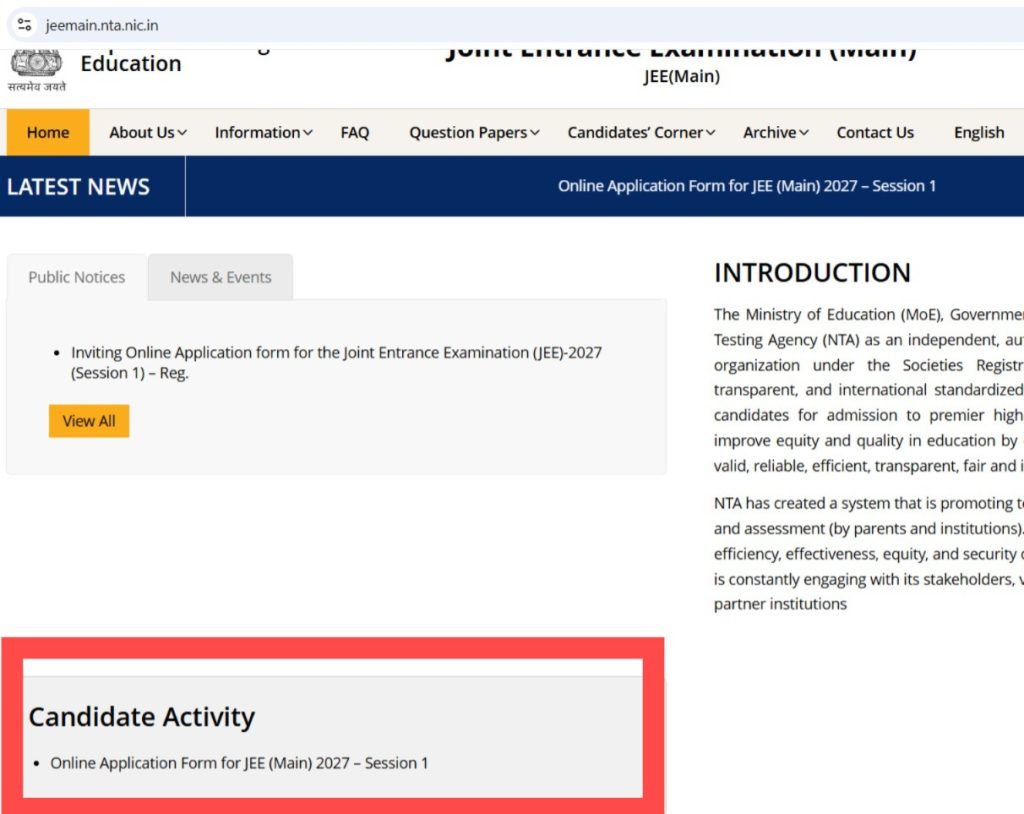
Candidates must complete the process within the prescribed deadline. An application is not considered successfully submitted merely because a candidate has registered or filled in the details. Successful fee payment and generation of the confirmation page are essential to confirm the application.
The application process is relevant to Indian nationals, candidates residing abroad, Non-Resident Indians (NRIs), Overseas Citizens of India (OCIs) and foreign nationals, subject to the applicable examination and admission rules. Applicants must provide accurate information about their nationality, qualifying examination, address and documents.
JEE Main 2027 Registration: Latest Update
NTA has opened the online application window for JEE Main 2027 Session 1. Candidates can apply through the official JEE Main website.
- Registration start date: 24 October 2026
- Last date to apply without a late fee: 22 November 2026, up to 11:50 PM
- Last date for regular application fee payment: 22 November 2026, up to 11:50 PM
- Application window with late fee: 23 November to 26 November 2026
- Last date for late application and fee payment: 26 November 2026, up to 11:50 PM
- Application correction window: 27 November to 29 November 2026
- Examination city information: 30 December 2026
- Admit card: 13 January 2027
- JEE Main Session 1 examination: 20, 21, 22, 23, 24 and 28 January 2027
Candidates should submit the application well before the deadline instead of waiting until the final day. Applicants using overseas documents or payment facilities should allow sufficient time to resolve any verification or transaction issues.
JEE Main 2027 Registration: Important Dates
The following table provides the important dates for the JEE Main 2027 Session 1 application process.
| Event | Date |
|---|---|
| JEE Main 2027 Session 1 registration begins | 24 October 2026 |
| Last date to submit the application without a late fee | 22 November 2026 |
| Last date for regular examination fee payment | 22 November 2026 |
| Application window with late fee | 23–26 November 2026 |
| Last date for late application fee payment | 26 November 2026 |
| Application correction window | 27–29 November 2026 |
| Examination city information | 30 December 2026 |
| Admit card availability | 13 January 2027 |
| Session 1 examination dates | 20, 21, 22, 23, 24 and 28 January 2027 |
Important: The dates above are for Session 1. NTA will provide the separate application schedule for Session 2 through the applicable official announcement. Candidates should not assume that the Session 1 registration deadline also applies to Session 2.
JEE Main 2027 Registration: Official Website and Application Link
Candidates must submit their applications through the official NTA examination portal.
Official website: https://jeemain.nta.nic.in/
JEE Main 2027 Session 1 application page: https://jeemain.nta.nic.in/online-application-form-for-jee-main-2027-session-1/
Official NTA website: https://nta.ac.in/
Candidates should use the official portal to register, log in, upload documents, pay the examination fee and download the confirmation page. Avoid unofficial websites claiming to register candidates on their behalf.
Who Can Apply for JEE Main 2027?
JEE Main is conducted for admission to undergraduate engineering, architecture and planning programmes at participating institutions.
Candidates should first check the eligibility conditions in the JEE Main 2027 Information Bulletin before submitting the application.
According to the bulletin, candidates who passed their Class 12 or equivalent qualifying examination in 2025 or 2026, or are appearing for it in 2027, are eligible to appear for JEE Main 2027, subject to the applicable examination requirements.
Candidates who first passed Class 12 or an equivalent examination in 2024 or earlier are not eligible to appear for JEE Main 2027 under the specified year-of-passing rule.
The bulletin does not prescribe an age limit for appearing in JEE Main 2027. However, candidates must separately satisfy the admission requirements of their preferred institutions.
Before registering, applicants should verify their qualifying examination, year of passing, subject requirements and the admission conditions of the institutions they intend to apply to.
How to Register for JEE Main 2027 Online
The JEE Main 2027 application process uses the MeriPehchaan National Single Sign-On (NSSO) platform for registration.
Candidates should follow the official portal’s current instructions. The process can be completed in the following stages.
Step 1: Visit the Official JEE Main Website
Open the official website:
On the homepage, look for the link related to the JEE Main 2027 Session 1 Online Application Form.
Open the application link and read the instructions displayed on the portal before proceeding.
Candidates should ensure that they are applying for JEE Main 2027 and not another examination or a previous examination year.
Step 2: Read the Registration Instructions
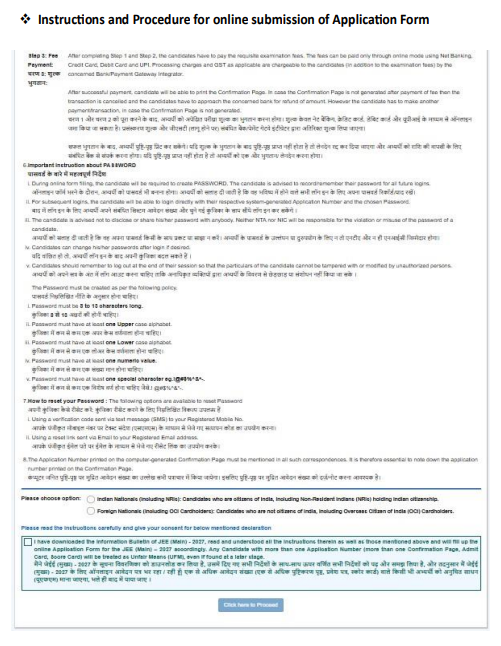
Before entering personal details, read the instructions carefully.
Check the following:
- Eligibility requirements
- Registration and application deadlines
- Documents required
- Photograph and signature specifications
- Application fee
- Examination paper options
- Examination-centre selection rules
- Payment instructions
- Correction-window details
Candidates should keep their documents ready before proceeding. This is particularly important for candidates who completed their qualifying examination outside India or need to upload passport or disability-related documents.
Step 3: Complete Registration Through MeriPehchaan
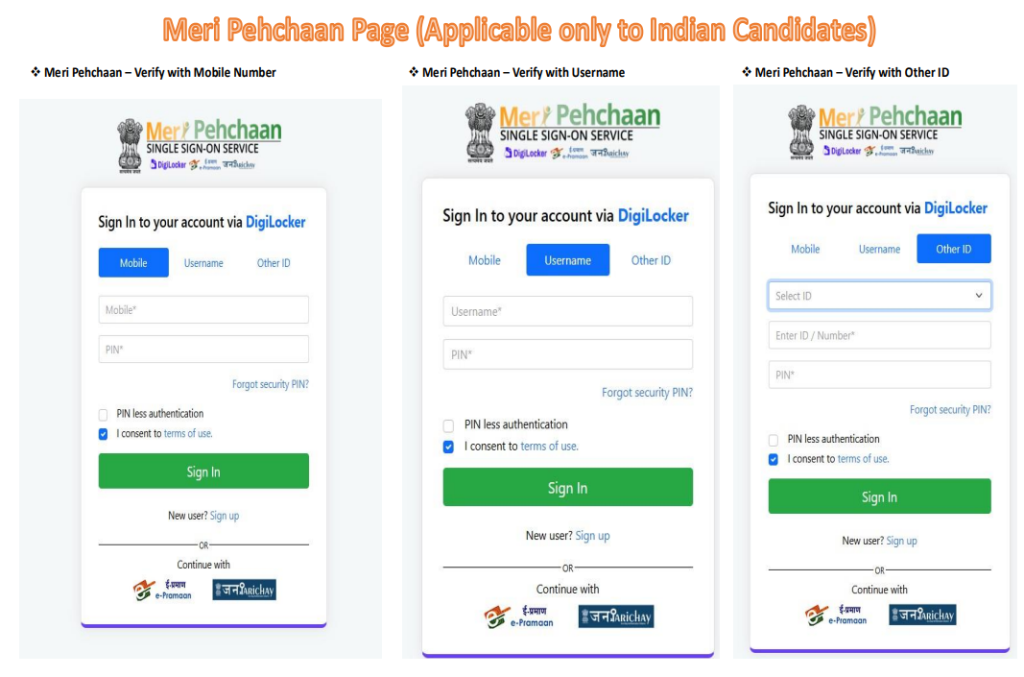
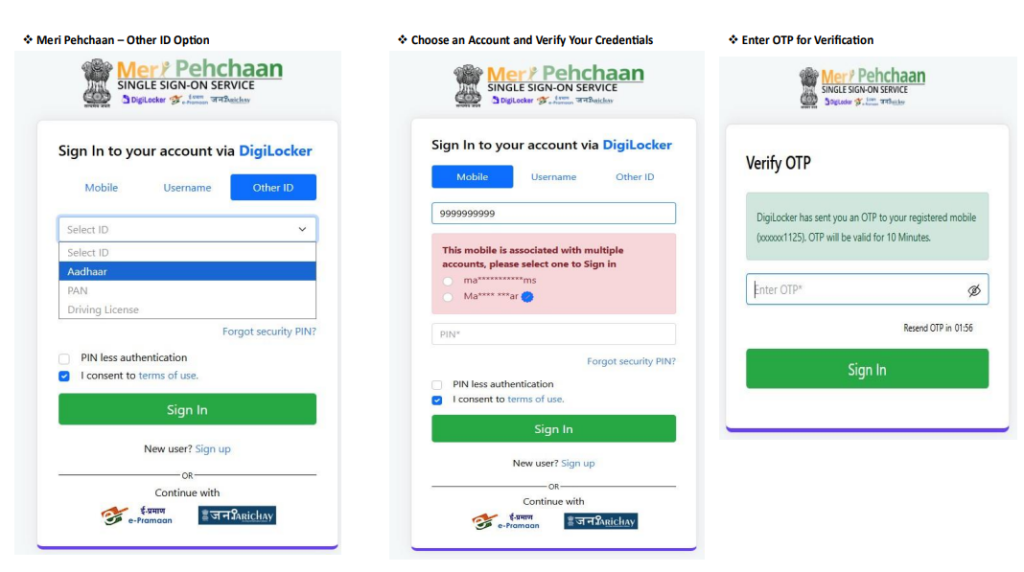
NTA has enabled application registration through the MeriPehchaan National Single Sign-On platform.
Follow the registration instructions displayed on the official portal. Enter the requested details and complete the authentication process.
MeriPehchaan supports government-service authentication using the available identity-provider options. The exact choices and verification steps presented to a candidate may depend on the portal’s current process.
Candidates should use their own details and ensure that the information entered is accurate.
Do not use another person’s identity information to create an application.
Step 4: Enter the Required Registration Details
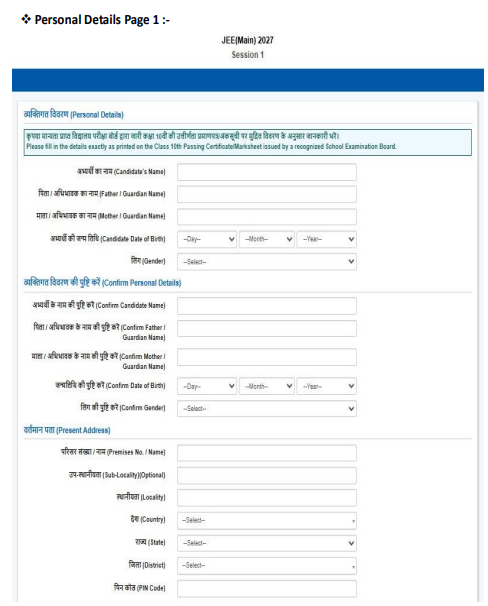
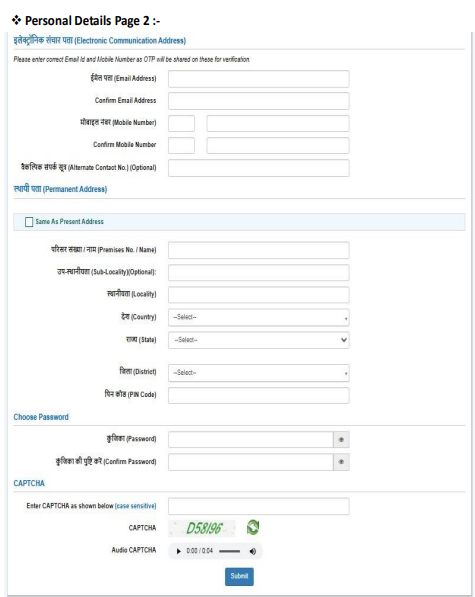
Complete the registration form by providing the information requested by the portal.
This stage generates the application number after successful submission of the required personal details.
Enter the requested information carefully, particularly:
- Name
- Date of birth
- Gender
- Contact details
- Email address
- Mobile number
- Other required registration information
Use the correct details from the relevant official records. Avoid spelling errors and incorrect dates.
Step 5: Create a Password
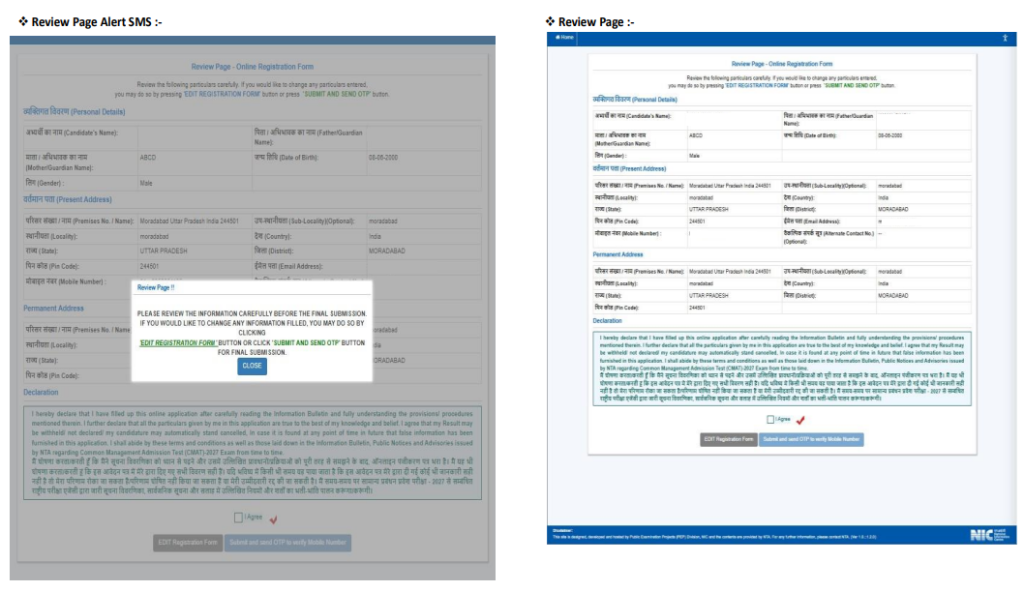
During the registration process, candidates must create a password for future logins.
The JEE Main 2027 Information Bulletin specifies the following password rules:
- The password must be 8 to 13 characters long.
- It must contain at least one uppercase alphabet.
- It must contain at least one lowercase alphabet.
- It must contain at least one number.
- It must contain at least one special character from the permitted set:
! @ # $ % ^ & * -
Choose a password that meets all these conditions.
Keep the password secure and do not share it with other people. NTA and NIC state that they will not be responsible for misuse resulting from a candidate sharing their password.
Step 6: Note Down the Application Number
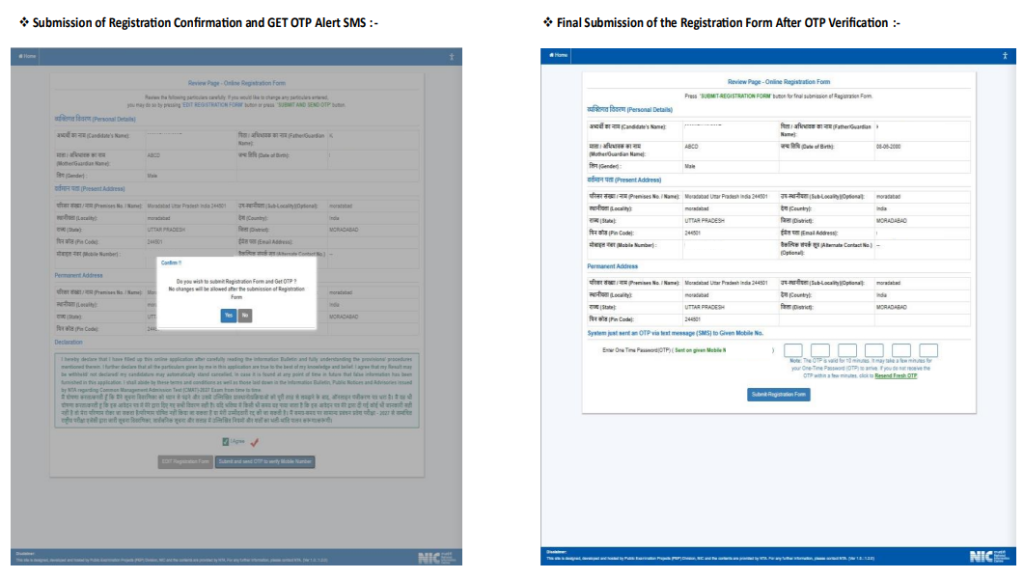
After successfully submitting the registration details, the system generates an Application Number.
This number is important because it is required to complete the remaining stages of the application and for future correspondence.
Candidates should:
- Write down the application number.
- Save it in a secure place.
- Keep a copy of the registration details if the portal provides one.
- Remember the password created during registration.
The application number will be used for both JEE Main 2027 sessions. Candidates applying for Session 2 later should use the existing application number according to NTA’s instructions rather than creating another application for the same examination cycle.
Step 7: Log In to Complete the Application Form
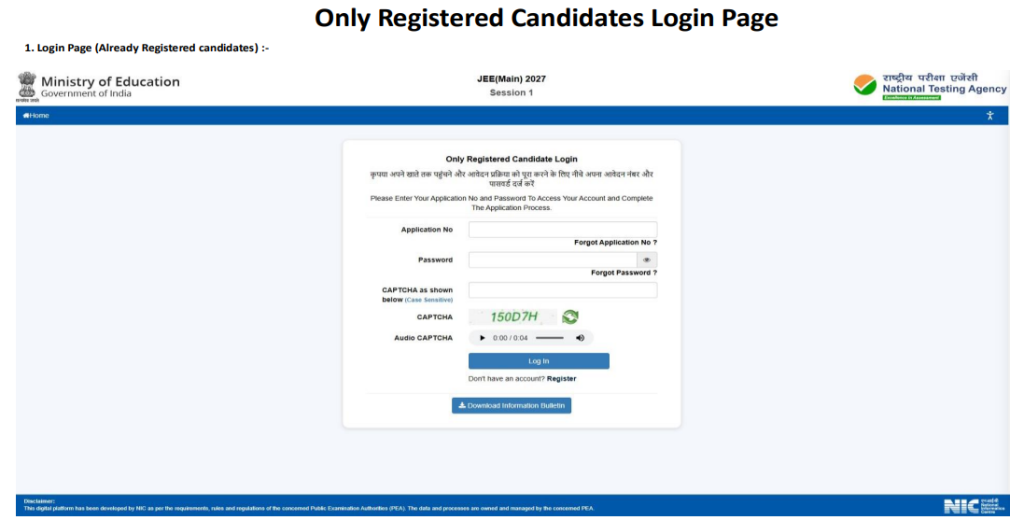
After registration, log in using the system-generated application number and the password created during registration, following the portal’s instructions.
The application form must then be completed with the remaining personal, examination-related and educational details.
Registration and application-form completion are separate stages. Generating an application number does not mean that the complete application has been submitted.
Candidates should finish the remaining stages and complete fee payment before the applicable deadline.
How to Fill the JEE Main 2027 Application Form
After registration, candidates must complete the online application form.
Step 8: Enter Personal Details
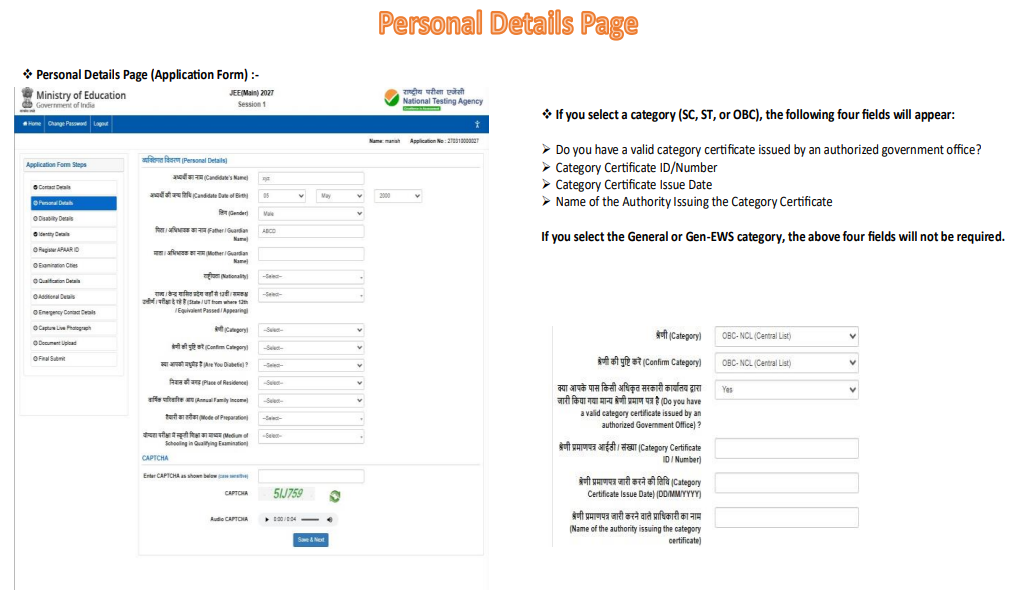
Fill in the personal information requested in the application form.
This may include the candidate’s name, date of birth, gender, nationality, category and other details displayed by the portal.
Enter information accurately and make sure it matches the relevant official records.
Indian nationals, NRIs, OCIs and foreign nationals should pay particular attention to the nationality-related fields. NRI status alone should not be treated as foreign nationality.
If the portal requests passport information or other nationality-related documentation, provide the information that applies to the candidate.
Step 9: Enter Communication Details
Provide the communication details requested by the application form.
These may include:
- Permanent address
- Present address
- State and district details
- PIN code, where applicable
- Mobile number
- Email address
- Other communication information requested by the portal
Candidates residing outside India should enter their information according to the fields and instructions displayed by NTA.
Use a valid mobile number and email address that the candidate can access throughout the examination process. These details may be needed for application-related communication, verification and password recovery.
Review the entered information before moving to the next stage.
Step 10: Enter Category and Reservation Details
Candidates must select the applicable category according to the available options and their valid supporting documents.
The application may ask candidates to select a category such as General, General-EWS, OBC-NCL, SC or ST, as applicable.
Candidates claiming PwD/PwBD-related provisions must follow the relevant instructions and upload the required certificate where requested.
Important instructions:
- Select a category only if the candidate is eligible to claim it.
- OBC reservation is subject to the applicable Central List and non-creamy-layer requirements.
- Category claims must be supported by valid documents where required.
- Do not assume that NRI or OCI status automatically provides a particular reservation benefit.
- Candidates must follow the admission and reservation rules applicable to their circumstances.
Incorrect category information can cause problems during document verification and admission.
Step 11: Enter Class 10 and Class 12 Educational Details
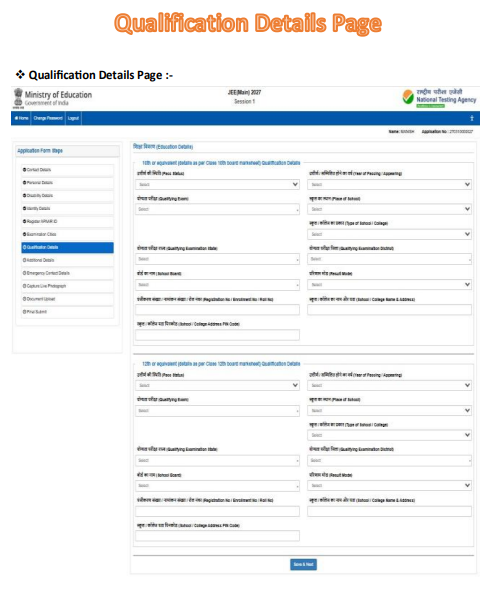
Fill in the educational information requested by the application form.
Candidates should have their Class 10 certificate or marksheet and Class 12 details ready.
The form may request information such as:
- Class 10 passing year
- Board name
- School or institution details
- Class 12 qualifying-examination status
- Class 12 passing year or appearing status
- Qualifying-examination roll number, registration number or enrolment number
- Other educational information requested by NTA
Candidates appearing for Class 12 in 2027 should enter the appropriate examination status and details according to the portal’s instructions.
Applicants who completed Class 12 abroad should carefully check the qualifying-examination requirements and any applicable equivalence documentation.
Step 12: Select the JEE Main 2027 Examination Paper
Candidates must choose the examination paper relevant to the course they intend to pursue.
JEE Main 2027 has the following papers:
| Paper | Course | Purpose |
|---|---|---|
| Paper 1 | B.E./B.Tech | Undergraduate engineering programmes |
| Paper 2A | B.Arch | Undergraduate architecture programmes |
| Paper 2B | B.Planning | Undergraduate planning programmes |
Candidates should select the paper or combination of papers appropriate to their intended course.
Applicants should carefully review the available options before proceeding. Selecting the wrong paper may affect the courses for which the candidate can be considered.
The examination fee depends on the number of papers selected, the candidate’s category and gender, and the examination-centre location.
Step 13: Select the Examination Language
JEE Main 2027 is offered in the languages specified by NTA.
The languages listed in the Information Bulletin are:
- English
- Hindi
- Assamese
- Bengali
- Gujarati
- Kannada
- Malayalam
- Marathi
- Odia
- Punjabi
- Tamil
- Telugu
- Urdu
Choose the language carefully from the options available in the application form. Candidates should confirm that the selected language is available for their examination-centre location and paper.
Step 14: Select Examination Cities
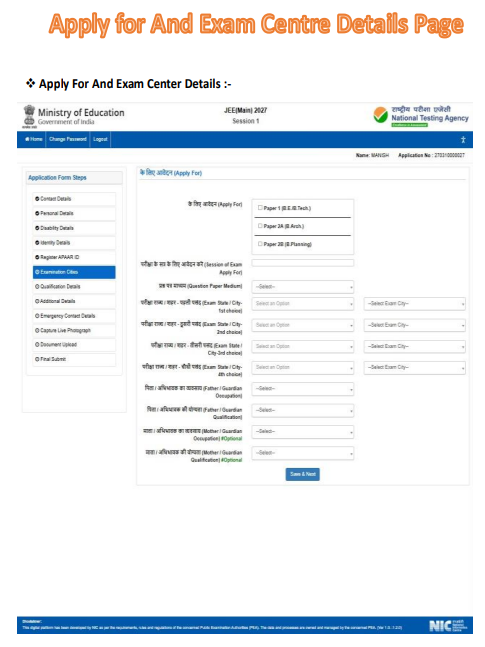
Candidates must select their preferred examination cities from the options available in the online application form.
The available choices may depend on the locations and arrangements provided by NTA.
Applicants should:
- Review the available city list.
- Select the permitted preferences carefully.
- Ensure that the selected cities are practical for travel.
- Check the examination-centre rules applicable to their circumstances.
Foreign nationals, NRIs and OCI candidates should use the examination-city options displayed by the portal. They should not assume that a particular overseas city will be available unless it appears in the official list.
The city information announced later by NTA will indicate the examination city allocated to the candidate. The city information is not the same as the admit card.
Step 15: Upload the Live Photograph and Scanned Documents
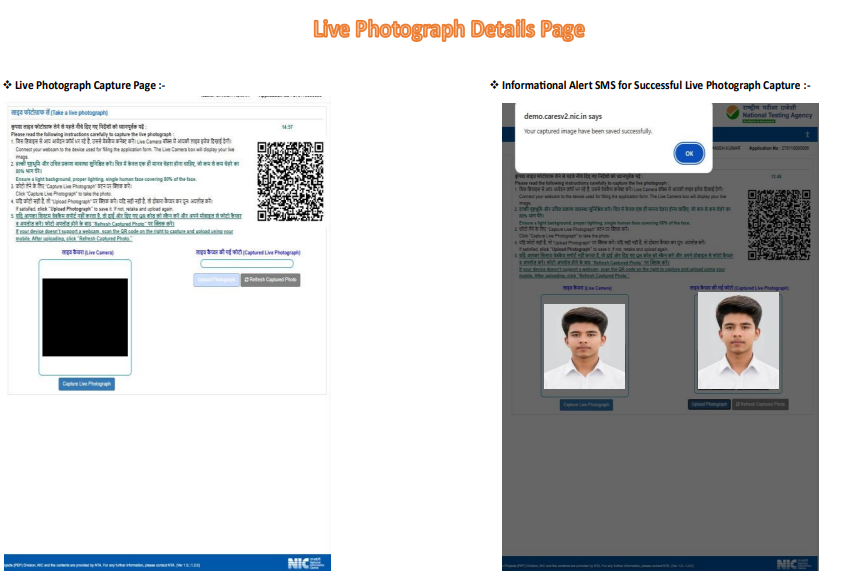
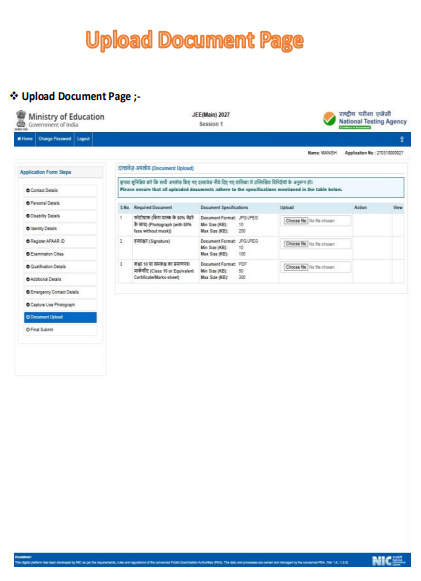
Upload the required photograph, signature and supporting documents in the prescribed formats.
Before uploading each file, check:
- Correct file format
- Required file size
- Image clarity
- Correct candidate details
- Whether the document is applicable to the candidate
- Whether the uploaded document is complete and readable
The scanned passport-size photograph must be in JPG/JPEG format and between 10 KB and 200 KB.
The signature must be in JPG/JPEG format and between 10 KB and 100 KB.
The Class 10 certificate or marksheet must be in PDF format and between 50 KB and 300 KB.
The disability/UDID certificate, physical-limitation certificate and non-Indian passport must be in PDF format and between 50 KB and 300 KB, wherever applicable.
Candidates should not upload another person’s photograph, signature or certificate.
Step 16: Preview and Review the Application Form
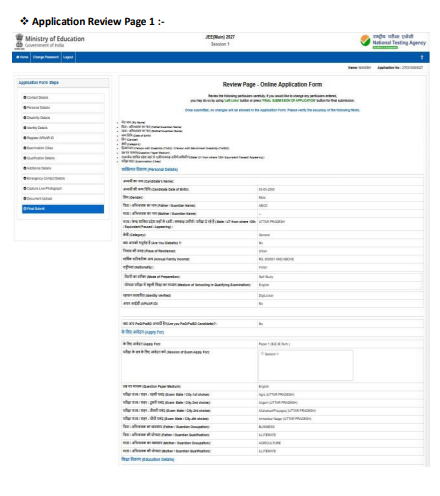
Before paying the fee, carefully review the information entered in the application form.
Check the following details:
- Candidate’s name and date of birth
- Nationality and other applicable identity details
- Gender and category
- Mobile number and email address
- Permanent and present addresses
- Class 10 and Class 12 details
- Qualifying-examination year
- Selected examination paper
- Examination language
- Examination-city preferences
- Uploaded photograph and signature
- Supporting documents, where applicable
Pay special attention to details that may not be editable after the correction window closes.
If something appears incorrect, follow the portal’s instructions before final submission and fee payment. NTA does not accept corrections sent through post, fax, WhatsApp, email or by hand in place of the permitted online correction process.
JEE Main 2027 Application Fee
Candidates must pay the prescribed examination fee to complete their applications.
The fee depends on:
- Candidate category
- Gender
- Number of papers selected
- Whether the examination centre is in India or outside India
The following tables reproduce the fee structure provided in the JEE Main 2027 Information Bulletin.
JEE Main 2027 Fee for One Paper
This fee applies when a candidate selects only one of the following: Paper 1, Paper 2A or Paper 2B.
| Candidate category | Gender | Examination centre in India | Examination centre outside India |
|---|---|---|---|
| General | Male | ₹1,000 | ₹5,000 |
| General | Female | ₹800 | ₹4,000 |
| General-EWS/OBC-NCL | Male | ₹900 | ₹4,500 |
| General-EWS/OBC-NCL | Female | ₹800 | ₹4,000 |
| SC/ST/PwD/PwBD | Male | ₹500 | ₹2,500 |
| SC/ST/PwD/PwBD | Female | ₹500 | ₹2,500 |
| Third Gender | — | ₹500 | ₹2,500 |
JEE Main 2027 Fee for Two or More Papers
The following fee applies to the listed combinations of papers, including candidates selecting two papers or all three papers.
| Candidate category | Gender | Examination centre in India | Examination centre outside India |
|---|---|---|---|
| General/General-EWS/OBC-NCL | Male | ₹2,000 | ₹10,000 |
| General/General-EWS/OBC-NCL | Female | ₹1,600 | ₹8,000 |
| SC/ST/PwD/PwBD | Male | ₹1,000 | ₹5,000 |
| SC/ST/PwD/PwBD | Female | ₹1,000 | ₹5,000 |
| Third Gender | — | ₹1,000 | ₹5,000 |
Additional charges: Applicable payment-gateway processing charges and GST may be added to the examination fee.
Late fee: Candidates submitting their applications during the permitted late-application window must pay an additional late fee of ₹500, in addition to the applicable examination fee.
How Is the JEE Main 2027 Fee Determined for NRI, OCI and Foreign Candidates?
The fee table distinguishes between examination centres inside India and outside India. It also varies by the candidate category, gender and number of papers selected.
Candidates should therefore determine their fee using the applicable category and examination-centre location shown in the official application process.
For example, an Indian citizen living abroad should not automatically select the outside-India fee merely because they are an NRI. The applicable fee depends on the examination-centre location and the details specified in the form.
Similarly, OCI candidates and foreign nationals should use the fee category and examination-centre options applicable to their application.
The fee shown by the official portal should be checked before payment.
Step 17: Pay the JEE Main 2027 Application Fee Online
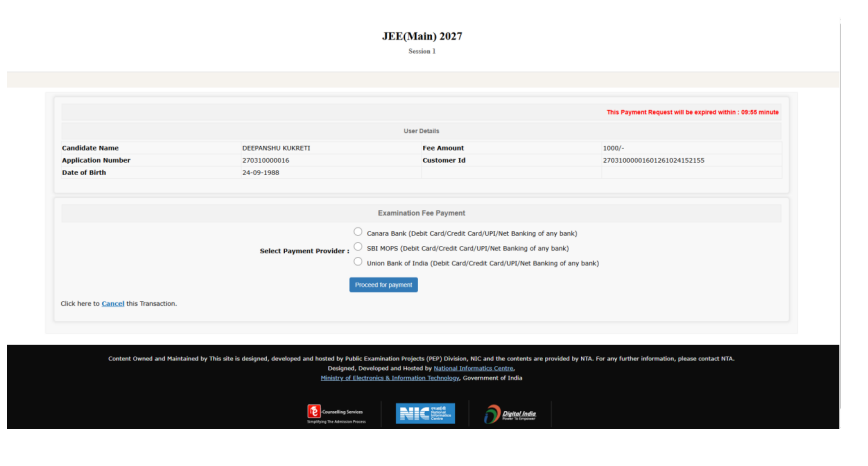
After completing the application form and uploading the required documents, proceed to fee payment.
The JEE Main 2027 Information Bulletin lists the following payment methods:
- Debit card
- Credit card
- Net banking
- UPI
Select an available payment method and follow the instructions displayed by the payment gateway.
Before paying:
- Confirm the examination fee.
- Check the applicable processing charges and taxes.
- Ensure that the selected payment account has sufficient funds.
- Keep the payment details available until the transaction is completed.
- Avoid refreshing or closing the payment page while a transaction is being processed.
After making the payment, save any transaction reference or receipt provided by the payment gateway.
Step 18: Check the Payment Status
After completing the payment, verify whether the transaction was successful.
A successful application-fee transaction is required for the application to be confirmed.
If the payment status is not marked as successful or the confirmation page does not appear, do not assume that the application is complete.
Follow these steps:
- Check the transaction status with the relevant bank or payment gateway.
- If the bank confirms that the payment failed, make another payment before the deadline, following the official instructions.
- If the bank confirms successful payment but the confirmation page is unavailable, contact the relevant payment gateway or NTA helpline.
- Keep the transaction reference, date and time of payment, and any available proof of the transaction.
NTA states that duplicate payments received during the resolution of a payment issue will be refunded after fee reconciliation through the same payment mode.
Step 19: Download the JEE Main 2027 Confirmation Page
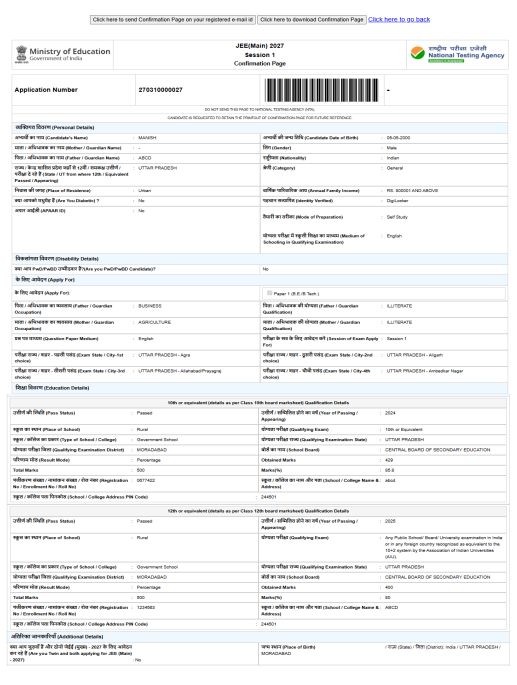
After successful fee payment, the candidate should be able to generate the confirmation page.
Downloading the confirmation page is one of the most important final steps in the JEE Main 2027 registration process.
Once the confirmation page is available:
- Download the PDF.
- Save a copy on the device.
- Keep a backup copy.
- Print a copy if possible.
- Verify that the application number and details are visible.
- Retain the document for future reference.
The confirmation page serves as evidence that the application and fee-payment process has been completed successfully.
Candidates should not rely only on a payment receipt or an application number. They should ensure that the confirmation page has been generated.
Step 20: Keep the Application Number and Password Safe
Candidates will need their application number and password for future logins.
These details may be required to access the application, check updates, use the correction facility when available and complete the process for a subsequent session.
Do not share the password with other people.
The Information Bulletin provides password-reset options through a verification code sent to the registered mobile number or a reset link sent to the registered email address.
Candidates should keep their registered contact details accessible and note down the application number printed on the confirmation page.
JEE Main 2027 Registration for Indian Nationals
Indian nationals can apply online by completing the registration and application process prescribed by NTA.
Indian applicants should keep the following information and documents ready:
- Full name as recorded in the relevant official records
- Date of birth
- Gender
- Valid mobile number and email address
- Personal and communication details
- Class 10 or equivalent certificate/marksheet
- Class 12 or equivalent examination details
- Class 12 roll number, registration number or enrolment number, where applicable
- Category details, if applicable
- PwD/PwBD or UDID details, where applicable
- Recent scanned photograph
- Signature in the prescribed format
- Other information requested by the application portal
Candidates appearing for their Class 12 examination in 2027 can enter their roll number, registration number, enrolment number or other applicable details in the relevant fields, as permitted by the application form.
Applicants should enter their details accurately and ensure that their documents are legible. Incorrect personal information, category claims or educational details can cause problems during verification or admission.
JEE Main 2027 Registration for NRI Candidates
NRI stands for Non-Resident Indian. NRI status relates to residence and does not, by itself, determine a person’s citizenship.
An NRI who is an Indian citizen should distinguish between residential status and nationality while completing the JEE Main 2027 application. Such a candidate should provide the nationality and other details that accurately apply to them, rather than selecting a foreign nationality merely because they live abroad.
NRIs should:
- Complete the application through the official NTA website.
- Enter their actual nationality and personal details.
- Provide accurate communication and educational information.
- Follow the document requirements shown in the application form.
- Select an examination centre from the available choices.
- Pay the fee applicable to the selected paper or papers and examination-centre location.
- Save the application number, payment details and confirmation page.
An Indian citizen living outside India should not automatically be treated as a foreign national. Similarly, NRI status alone should not be assumed to confer a particular reservation category or admission entitlement.
Important: NRI status and admission eligibility are separate matters. Candidates should verify the admission rules of their preferred institutions and counselling authorities, especially if they intend to apply under an NRI admission route.
JEE Main 2027 Registration for OCI Candidates
OCI stands for Overseas Citizen of India. OCI status is not the same as Indian citizenship.
OCI candidates should carefully enter the applicable nationality and other particulars in the online application. They should follow the document-upload instructions applicable to their circumstances.
The JEE Main 2027 Information Bulletin specifically addresses OCI candidates in its state-of-eligibility provisions:
- An OCI candidate who passed Class 12 or an equivalent examination from an institution in India has a state-of-eligibility position at par with Indian nationals for this purpose.
- An OCI candidate who passed Class 12 or an equivalent examination from an institution abroad is eligible for All India quota seats, but not Home State quota seats, in NITs, IIITs and other CFTIs, subject to the applicable admission rules.
OCI candidates should not assume that their admission eligibility is identical to that of Indian citizens in every respect. The rules for appearing in the examination, state of eligibility, category benefits, seat allocation and admission can differ.
Where the application form requires a non-Indian passport for a foreign national, including an OCI candidate, the candidate should upload the passport copy in the prescribed PDF format. Applicants must follow the exact instructions shown in the applicable form and bulletin.
JEE Main 2027 Registration for Foreign Nationals
Foreign nationals can apply for JEE Main 2027 subject to the examination and admission requirements applicable to them.
Candidates who are not Indian citizens should pay particular attention to nationality, passport and qualifying-examination details.
Foreign applicants should prepare the following, as applicable:
- Valid passport details
- Scanned copy of the non-Indian passport
- Personal and communication details
- Details of the Class 12 or equivalent qualifying examination
- Recent live photograph and scanned passport-size photograph
- Scanned signature
- Details of the examination paper selected
- Examination-centre preference
- Payment method accepted by the portal
- Any other document requested by NTA
The bulletin specifies that a scanned copy of the non-Indian passport, including for foreign nationals and OCI candidates, must be uploaded as a PDF between 50 KB and 300 KB.
Candidates whose Class 12 or equivalent qualification was completed outside India should also check the qualifying-examination requirements. The bulletin lists recognised equivalent examinations and states that candidates who completed Class 12 or an equivalent examination outside India, or from a board not specified in the list, should produce an Association of Indian Universities (AIU) certificate confirming equivalence where required.
Foreign nationals should not assume that taking JEE Main automatically guarantees admission to a particular institution. They must separately meet the institution’s admission and seat-allocation requirements.
Difference Between Indian Nationals, NRIs, OCIs and Foreign Nationals
| Applicant | What to remember while applying |
|---|---|
| Indian national residing in India | Enter the applicable nationality, personal details and educational information. |
| Indian national residing abroad/NRI | NRI status does not automatically make the candidate a foreign national. Enter the correct nationality and follow the portal’s document instructions. |
| OCI candidate | Enter the applicable nationality and OCI-related details requested by the portal. Check the bulletin’s state-of-eligibility and admission provisions. |
| Foreign national | Enter the actual nationality and passport details requested by the application form. Upload the non-Indian passport in the prescribed format where required. |
| Candidate who completed Class 12 abroad | Check qualifying-examination equivalence requirements and the applicable state-of-eligibility rules. |
Important: The exact fields displayed in the online application must be followed. Applicants should not select a nationality, category or eligibility option simply because they believe it may improve their admission chances.
Documents Required for JEE Main 2027 Registration
Candidates should prepare the required documents before starting the online application. This reduces the risk of uploading the wrong file or missing the deadline.
The JEE Main 2027 Information Bulletin specifies the following document requirements.
| Document | Required format | File size |
|---|---|---|
| Live photograph | Captured during the application process | Follow the live-capture instructions |
| Recent scanned passport-size photograph | JPG/JPEG | 10 KB to 200 KB |
| Scanned signature | JPG/JPEG | 10 KB to 100 KB |
| Class 10 or equivalent certificate/marksheet | 50 KB to 300 KB | |
| Disability/UDID certificate, where applicable | 50 KB to 300 KB | |
| Certificate regarding physical limitation to write, where applicable | 50 KB to 300 KB | |
| Non-Indian passport for foreign nationals, including OCI candidates, where applicable | 50 KB to 300 KB |
All uploaded documents must be clear and legible. Applicants should ensure that the uploaded file belongs to the candidate and contains the correct information.
1. Photograph Requirements for JEE Main 2027
The application process requires candidates to upload a live photograph as well as a recent scanned passport-size photograph.
The scanned photograph must meet the following conditions:
- It must be a recent, coloured passport-size photograph.
- The face should be clearly visible.
- Approximately 80% of the face, including the ears, should be visible.
- The photograph should have a white background.
- The candidate should not wear a mask in the photograph.
- The scanned image must be in JPG/JPEG format.
- The file size must be between 10 KB and 200 KB.
Live photograph: Candidates must capture a live photograph during the application process. They should switch on their device’s camera or connect a webcam before starting the relevant step.
If the computer does not support a webcam, the candidate can use the QR-code facility described by the portal and capture the photograph using a mobile device or tablet.
Ensure there is sufficient lighting, a white background and clear face visibility during the live photograph capture.
2. Signature Requirements for JEE Main 2027
Candidates must upload their scanned signature in the prescribed format.
- Format: JPG/JPEG
- File size: 10 KB to 100 KB
- Quality: Clear and legible
Before uploading the signature, check that the file is readable and belongs to the applicant. Do not upload another person’s signature or an unrelated image.
3. Class 10 Certificate or Marksheet
The JEE Main 2027 application requires a scanned copy of the Class 10 or equivalent certificate/marksheet in the prescribed format.
- Format: PDF
- File size: 50 KB to 300 KB
The document should be clear enough for the details to be read. Candidates should check that the uploaded document is the correct certificate or marksheet and that it belongs to them.
4. Disability or UDID Certificate
Candidates claiming applicable disability-related provisions should provide the required disability or UDID certificate as instructed by NTA.
- Format: PDF
- File size: 50 KB to 300 KB
NTA states that uploaded UDID details may be verified through the relevant government portal. Candidates without a UDID card should follow the bulletin’s instructions concerning the appropriate disability certificate.
Any mismatch or validation issue should be addressed through the correction facility when available. Applicants should not assume that an incorrect disability claim or missing document can be corrected after the permitted correction period closes.
5. Certificate Regarding Physical Limitation to Write
Candidates for whom the applicable examination provisions require a certificate concerning physical limitations to write must upload the relevant certificate.
- Format: PDF
- File size: 50 KB to 300 KB
The certificate must meet the applicable requirements specified in the Information Bulletin. Candidates should check the relevant annexure and instructions before uploading it.
6. Passport Requirement for Foreign Nationals and OCI Candidates
The Information Bulletin specifies a non-Indian passport upload for foreign nationals, including OCI candidates, where applicable.
- Format: PDF
- File size: 50 KB to 300 KB
The passport copy must be clear and legible. Candidates should follow the nationality and document instructions displayed in the application portal and ensure that the details entered in the form are consistent with their documents.
JEE Main 2027 Session 2 Registration
JEE Main 2027 is conducted in two sessions.
Candidates can apply for Session 1 and later receive a separate opportunity to apply for Session 2.
According to the Information Bulletin:
- Candidates can register for Session 1 and pay the applicable examination fee.
- A separate opportunity will be provided for Session 2.
- Candidates who have already applied for Session 1 should use the same application number when applying for Session 2, as instructed by NTA.
- Candidates who wish to appear only for Session 2 can register when the Session 2 application window becomes active.
- The Session 2 application schedule will be announced separately.
Candidates should not submit multiple applications for the same examination cycle. NTA warns that submitting more than one application form can result in cancellation and action under its unfair-means provisions.
JEE Main 2027 Application Correction Window
NTA has announced the Session 1 application correction window from 27 November to 29 November 2026.
The correction facility allows changes only in the fields permitted by NTA.
Candidates should carefully review their application before submission to reduce the need for corrections.
Important points:
- Not every field is necessarily editable.
- Changes must be made through the official online correction facility.
- Corrections sent by post, fax, WhatsApp, email or by hand will not be accepted.
- Applicants should complete any permitted correction before the window closes.
- Candidates should not assume that every incorrect document or eligibility claim can be changed later.
After making an allowed correction, review the revised information and save any updated record provided by the portal.
Common Mistakes to Avoid During JEE Main 2027 Registration
Candidates can reduce application problems by avoiding the following mistakes.
1. Waiting until the last date: Heavy traffic or payment issues may delay submission. Complete the application early.
2. Entering incorrect personal details: Check the name, date of birth, nationality and other information carefully.
3. Confusing NRI status with nationality: An Indian citizen living abroad should not automatically select foreign nationality.
4. Selecting the wrong examination paper: Choose Paper 1, Paper 2A or Paper 2B according to the intended course.
5. Uploading files in the wrong format: Follow the required JPG/JPEG and PDF formats.
6. Uploading oversized or unclear files: Check the file-size limits and legibility before uploading.
7. Entering incorrect educational details: Verify the board, qualifying-examination year and other details.
8. Selecting an incorrect category: Claim reservation only when eligible and able to meet the applicable documentation requirements.
9. Assuming registration means the application is complete: Complete fee payment and download the confirmation page.
10. Making multiple applications: NTA does not permit candidates to submit multiple application forms for JEE Main 2027.
11. Losing the application number or password: Save the login details securely for future use.
12. Assuming a successful payment guarantees submission: Confirm that the application confirmation page has been generated.
What to Do After Completing JEE Main 2027 Registration
After submitting the application, candidates should keep track of the remaining examination events.
The next important stages include:
- Application correction window, where permitted
- Examination city information
- Admit card release
- JEE Main Session 1 examination
- Provisional answer key and response-sheet updates
- Result and scorecard announcements
- Session 2 application, if the candidate wishes to appear again
Candidates should keep their application number and password safe and use the official website for examination-related updates.
JEE Main 2027 Registration: Contact Details
If candidates experience difficulties with registration or the application process, they can contact NTA using the official contact details provided in the Information Bulletin.
Official website: https://jeemain.nta.nic.in/
NTA website: https://nta.ac.in/
Helpline numbers: 011-40759000 / 011-69227700
Email: jeemain@nta.ac.in
For payment-related problems, candidates should first check the transaction status and use the relevant bank or payment-gateway support details provided in the Information Bulletin. If the payment is successful but the confirmation page is not generated, they can contact NTA for assistance.
JEE Main 2027 Registration FAQs
1. When did JEE Main 2027 registration start?
JEE Main 2027 Session 1 registration started on 24 October 2026.
2. What is the last date for JEE Main 2027 Session 1 registration?
The last date to submit the application without a late fee is 22 November 2026, up to 11:50 PM.
3. Can candidates apply after 22 November 2026?
NTA has provided a late-application window from 23 November to 26 November 2026, with an additional late fee of ₹500. The final deadline for the late application and fee payment is 26 November 2026, up to 11:50 PM.
4. What is the official website for JEE Main 2027 registration?
Candidates can register through the official JEE Main website, https://jeemain.nta.nic.in/.
5. How can I register for JEE Main 2027?
Open the official website, select the Session 1 application link, follow the registration instructions, enter the required details, create a password and note down the application number.
6. Is registration enough to complete the JEE Main 2027 application?
No. Candidates must complete the application form, upload the required documents, pay the examination fee and download the confirmation page.
7. What is the JEE Main 2027 application fee?
The fee depends on the candidate’s category, gender, number of papers and examination-centre location. For one paper at a centre in India, the listed fee ranges from ₹500 to ₹1,000 for the categories shown in the Information Bulletin. Candidates should check the complete fee table for their circumstances.
8. What is the JEE Main 2027 late fee?
The additional late fee is ₹500, payable along with the applicable examination fee during the permitted late-application period.
9. What is the photograph size for JEE Main 2027?
The scanned passport-size photograph must be in JPG/JPEG format and between 10 KB and 200 KB. Candidates must also capture a live photograph during the application process.
10. What is the signature size for JEE Main 2027?
The scanned signature must be in JPG/JPEG format and between 10 KB and 100 KB.
11. Is the Class 10 marksheet required for JEE Main 2027 registration?
The Information Bulletin specifies a scanned Class 10 or equivalent certificate/marksheet in PDF format, with a file size between 50 KB and 300 KB.
12. Can NRI candidates apply for JEE Main 2027?
Candidates living abroad should follow the official eligibility and application instructions. An Indian citizen living abroad should not automatically select foreign nationality because of NRI status. The applicable fee depends on the selected paper or papers and examination-centre location.
13. Can OCI candidates apply for JEE Main 2027?
OCI candidates should follow the official application instructions and provide the required identity and passport details. They should also check the bulletin’s specific state-of-eligibility and admission provisions.
14. Can foreign nationals apply for JEE Main 2027?
Foreign nationals should follow NTA’s application instructions, provide accurate nationality and passport details and meet the applicable examination and admission requirements. The bulletin specifies a non-Indian passport upload in PDF format between 50 KB and 300 KB where applicable.
15. Can students studying abroad apply for JEE Main 2027?
Candidates should check whether their qualifying examination meets NTA’s requirements. The bulletin lists qualifying examinations and specifies that an AIU equivalence certificate should be produced where required for examinations completed outside India or through boards not specified in the list.
16. Is Aadhaar compulsory for JEE Main 2027 registration?
Candidates should follow the identity-verification options and instructions presented by the official registration portal. They should not assume that a particular identity document is compulsory or that another document is accepted without checking the applicable instructions.
17. Can I apply for both JEE Main 2027 sessions?
Yes. Candidates can apply for Session 1 and later apply for Session 2 using the same application number, according to NTA’s instructions. Candidates who wish to appear only for Session 2 can register when that application window opens.
18. Can I submit two JEE Main 2027 application forms?
No. NTA does not permit multiple application forms from the same candidate for JEE Main 2027. Submitting multiple applications can result in cancellation and action under the applicable rules.
19. What should I do if the application fee is paid but the confirmation page is not generated?
Check the payment status with the bank or payment gateway. If the transaction failed, follow the official instructions for making a fresh payment before the deadline. If the payment was successful but the confirmation page is unavailable, contact the relevant payment gateway or NTA helpline.
20. What is the password format for JEE Main 2027 registration?
The password must be 8 to 13 characters long and include at least one uppercase letter, one lowercase letter, one number and one permitted special character.
21. When is the JEE Main 2027 application correction window?
The Session 1 correction window is scheduled for 27 November to 29 November 2026. Only the fields permitted by NTA can be changed.
22. What happens after I submit the JEE Main 2027 application form?
After successful fee payment and generation of the confirmation page, candidates should save the page and keep their application number and password safe. They should then follow the official schedule for the correction window, examination city information, admit card and examination.
Conclusion
The JEE Main 2027 Registration process requires candidates to complete registration, fill in the application form, select the appropriate examination paper and city preferences, upload the required documents, pay the fee and download the confirmation page.
Indian nationals, NRIs, OCIs and foreign nationals should pay particular attention to nationality, passport, qualifying-examination and admission-related requirements. Candidates who completed their qualifying examination abroad should also check the applicable equivalence and state-of-eligibility provisions.
For Session 1, the regular application deadline is 22 November 2026, up to 11:50 PM. Candidates who need the late-application facility must complete the process by 26 November 2026, up to 11:50 PM, with the additional ₹500 late fee.
Apply through the official website and save the confirmation page after successful fee payment.
Stay connected with Manabadi for more latest JEE Main 2027 registration updates, application guidance and examination announcements.