









The Osmania University Hall Ticket 2026 has been released for various UG, PG, B.Ed, and other semester examinations scheduled in July/August 2026 through the official Examination Branch. Students appearing for BA, B.Com, B.Sc, BBA, BSW, MA, M.Com, M.Sc, B.Ed, Engineering, Professional, and Distance Education examinations can now check their respective hall ticket status and download/collect the admit card according to their course guidelines.
Students are advised to download or collect their OU Hall Ticket 2026 well before the examination date and verify all personal and examination details carefully to avoid any last-minute issues.
Manabadi is one of the most trusted educational portals in Telangana and Andhra Pradesh, providing the latest updates on OU Hall Tickets, OU Results, OU Time Tables, University Notifications, Entrance Exams, Recruitment Notifications, Answer Keys, Counselling Updates, and Admission News. Students can regularly visit Manabadi for instant educational alerts.
Contents
- 1
- 2 OU Hall Tickets 2026 Download
- 3 Osmania University Hall Ticket 2026 Overview
- 4 OU Hall Ticket 2026 Release Date
- 5 1. Direct Download Links (Highly Recommended)
- 6 Who Can Download the OU Hall Ticket 2026?
- 7 How to Download Osmania University Hall Ticket 2026?
- 8 For Regular & Backlog Students
- 9 Step 1: Visit the Official Osmania University Website
- 10 Step 2: Navigate to the Examination Section
- 11 Step 3: Click on “Hall Tickets”
- 12 Step 4: Select Your Course and Examination
- 13 Step 5: Enter the Required Login Details
- 14 Step 6: Download and Print the Hall Ticket
- 15 Step 7: If Online Download is Not Available
- 16 Step 8: Distance Education (PGRRCDE) Students
- 17 Important Instructions for Students
- 18 How Distance Education Students Can Download OU Hall Ticket
- 19 Steps:
- 20 Details Mentioned on Osmania University Hall Ticket
- 21 OU Hall Ticket Not Downloading? Here’s What to Do
- 22 Important Instructions for OU Exam 2026
- 23 Mandatory Documents
- 24 Reporting Time
- 25 Late Entry Rule
- 26 Photograph Issue
- 27 Items Strictly Prohibited
- 28 What Should You Do If You Cannot Download the Hall Ticket?
- 29 OU Examination Branch Contact Details
- 30 Why is the OU Hall Ticket Important?
- 31 Conclusion
OU Hall Tickets 2026 Download
Osmania University Hall Ticket 2026 Overview
| Particular | Details |
|---|---|
| University Name | Osmania University (OU) |
| Exam Name | Semester Examinations July/August 2026 |
| Hall Ticket Status | Released for various courses |
| Courses Covered | UG, PG, B.Ed, Engineering, Professional Courses, Distance Education |
| Mode of Hall Ticket | Online / College Distribution |
| Official Website | Osmania University |
| Examination Branch | OU Examination Branch |
| Location | Hyderabad, Telangana |
OU Hall Ticket 2026 Release Date
| Event | Date |
|---|---|
| Hall Ticket Release | July 2026 (Course-wise released) |
| Semester Examinations Begin | July/August 2026 |
| Reporting Time | 30 Minutes Before Exam |
1. Direct Download Links (Highly Recommended)
Create a table like this:
| Hall Ticket | Download Link |
|---|---|
| OU Examination Branch | http://www.ouexams.in/ |
| UG Hall Ticket | http://www.oucde.net/halltickets.php |
| PG Hall Ticket | http://www.oucde.net/halltickets.php |
| Distance Education Hall Ticket | http://www.oucde.net/ |
Who Can Download the OU Hall Ticket 2026?
The hall tickets are available for various examinations including:
- UG CBCS Semester Examinations
- BA
- B.Com
- B.Sc
- BBA
- BSW
- MA
- M.Com
- M.Sc
- B.Ed
- Engineering (BE/B.Tech)
- Professional Courses
- Distance Education (PGRRCDE)
- Backlog & Improvement Examinations
How to Download Osmania University Hall Ticket 2026?
Osmania University releases hall tickets for various UG, PG, B.Ed., Engineering, Pharmacy, Professional, and Distance Education examinations through different modes depending on the course and examination. While some students can download their hall tickets online from the official Examination Branch portal, many regular students studying in affiliated colleges receive their hall tickets through their respective college examination sections after verification.
Candidates should regularly check the official announcements to know whether their hall ticket is available for online download or needs to be collected from their college.
For Regular & Backlog Students
Students enrolled in Osmania University constituent and affiliated colleges usually receive their hall tickets after the college verifies examination fee payment, eligibility, attendance, and subject registration. Once the verification process is completed, colleges generate and distribute the hall tickets to eligible students.
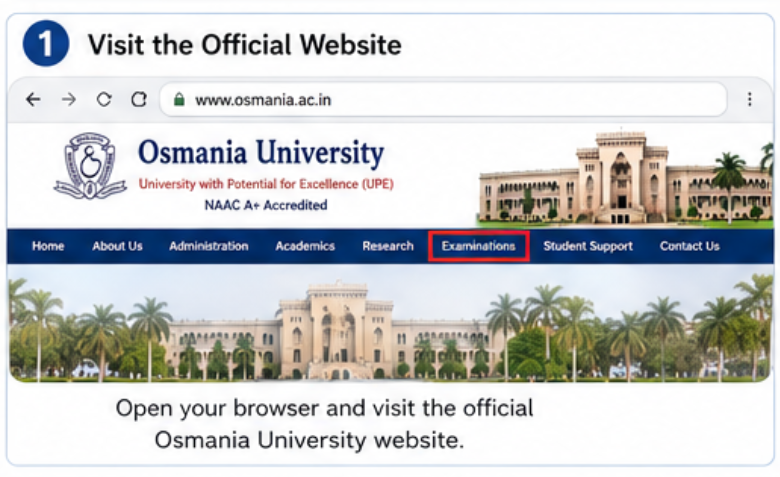
Step 1: Visit the Official Osmania University Website
Open your preferred web browser and visit the official Osmania University Examination Branch website. This portal hosts all examination-related services, including notifications, time tables, results, and hall tickets.
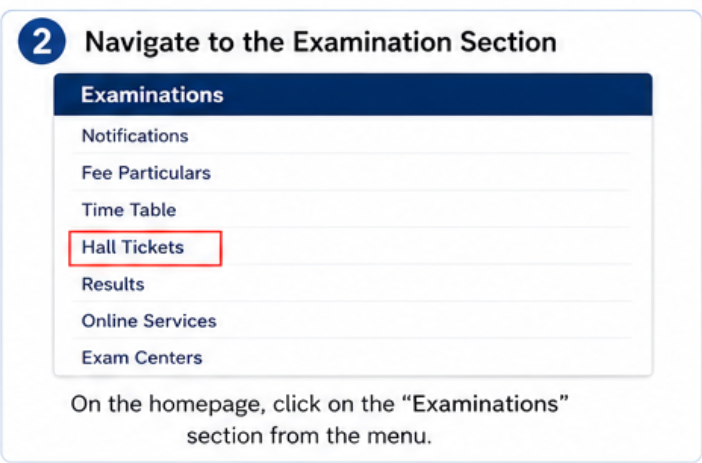
On the homepage, locate the Examinations or Examination Branch section. This section contains links for hall tickets, examination notifications, fee notifications, timetables, and other important updates.
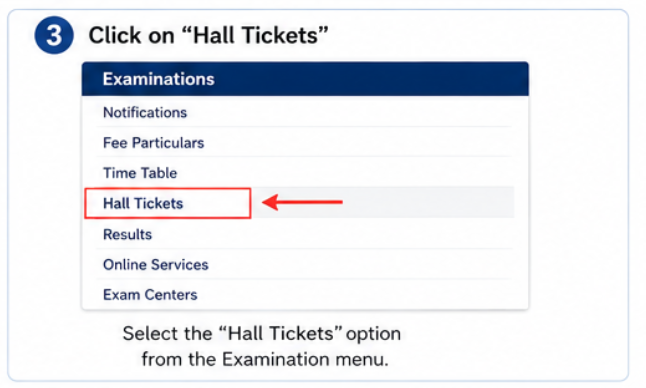
Step 3: Click on “Hall Tickets”
Select the Hall Tickets option from the examination menu. A list of available hall tickets for different courses and examinations will be displayed.
Step 4: Select Your Course and Examination
Choose the appropriate examination based on your course, such as:
- B.A.
- B.Com.
- B.Sc.
- BBA
- BCA
- BSW
- B.Ed.
- M.A.
- M.Sc.
- M.Com.
- MBA
- MCA
- B.E.
- B.Pharmacy
- Distance Education (PGRRCDE)
- Supplementary or Backlog Examinations
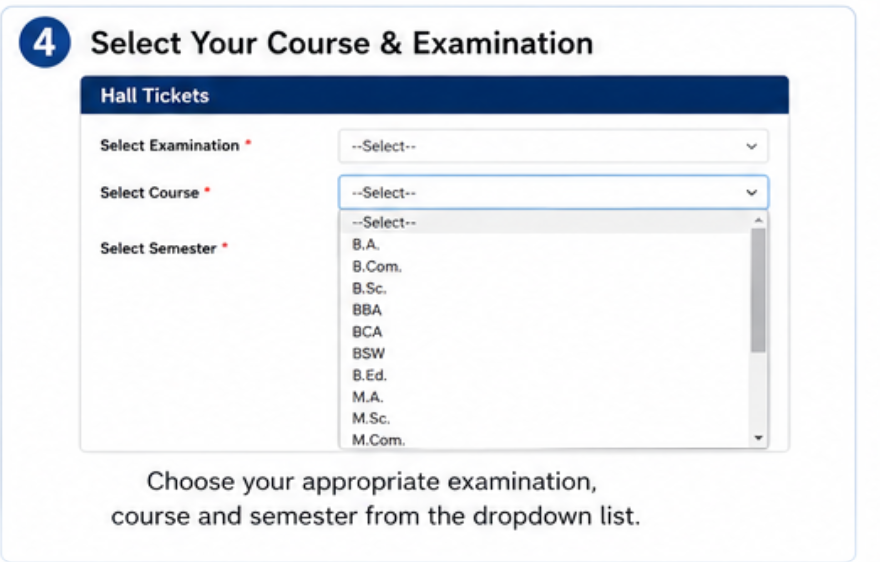
Make sure you select the correct semester and examination session.
Step 5: Enter the Required Login Details
If online hall ticket download is enabled for your examination, enter the required credentials such as:
- Hall Ticket Number or Registration Number
- Candidate Name (if required)
- Date of Birth (if applicable)
- Security Captcha
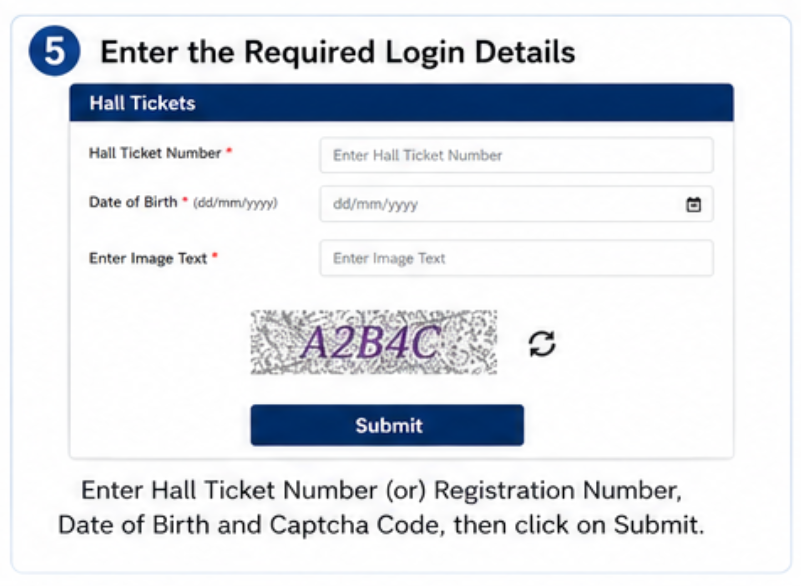
After entering the details correctly, click on the Submit button.
Step 6: Download and Print the Hall Ticket
Your hall ticket will appear on the screen. Carefully verify all the details before downloading it.
Check the following information:
- Student’s Name
- Father’s/Mother’s Name
- Hall Ticket Number
- Registration Number
- Course and Semester
- Subject Codes and Subject Names
- Examination Dates
- Examination Centre Name and Address
- Reporting Time
- Candidate Photograph and Signature (if available)
- Important Examination Instructions
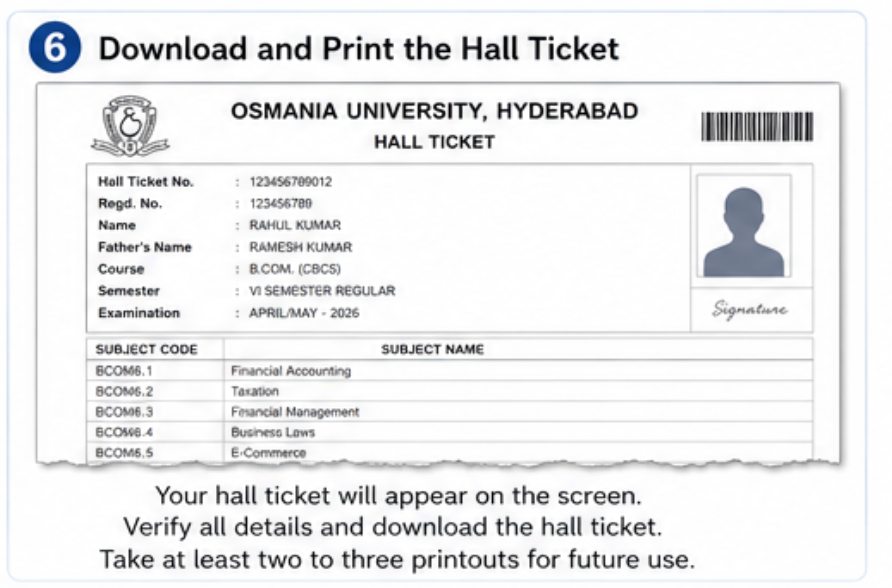
Download the hall ticket in PDF format and take at least two to three printouts for future use.
Step 7: If Online Download is Not Available
For many regular semester examinations, Osmania University issues hall tickets only through the College Login Portal.
In such cases:
- Visit your respective college examination branch.
- Contact the Examination Cell or Principal’s Office.
- Verify your examination fee payment and eligibility.
- Collect your signed and sealed hall ticket issued by the college.
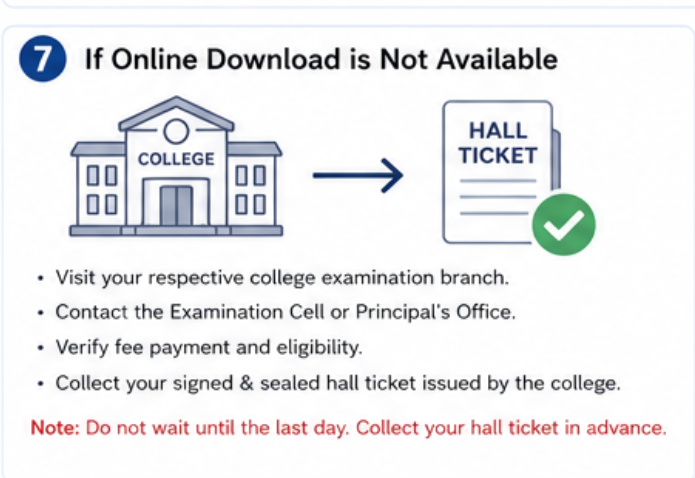
Students should not wait until the last day, as colleges may require time to complete the verification process.
Step 8: Distance Education (PGRRCDE) Students
Students studying under the Prof. G. Ram Reddy Centre for Distance Education (PGRRCDE) can download their hall tickets online when the university releases them.
Steps to Download:
- Visit the PGRRCDE Hall Ticket portal.
- Click on Hall Ticket Download.
- Select your Course and Examination.
- Enter your Hall Ticket/Registration Number and other required details.
- Click on Submit.
- Download the hall ticket and take a printout for the examination.
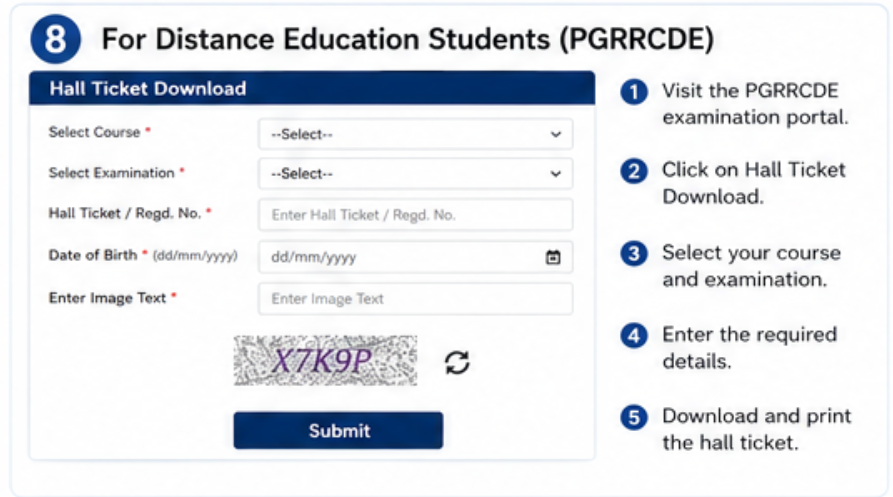
Note: If you are unable to download the hall ticket, contact the PGRRCDE Examination Section before the examination date.
Important Instructions for Students
- Carry the original hall ticket to the examination centre.
- Reach the examination centre at least 30–45 minutes before the reporting time.
- Verify all personal and examination details immediately after downloading the hall ticket.
- If any discrepancy is found, report it to your college or the Examination Branch before the examination date.
- Do not write or damage the hall ticket.
- Carry a valid photo identity proof along with the hall ticket if required.
- Electronic gadgets such as mobile phones, smart watches, calculators (unless permitted), and Bluetooth devices are strictly prohibited inside the examination hall.
- Preserve your hall ticket safely until the completion of examinations and declaration of results.
How Distance Education Students Can Download OU Hall Ticket
Students studying under PGRRCDE (Prof. G. Ram Reddy Centre for Distance Education) can directly download their hall tickets online.
Steps:
- Visit the official PGRRCDE Hall Ticket page.
- Select your course.
- Choose Year/Semester.
- Enter your Enrollment Number / Registration Number.
- Enter Date of Birth.
- Click Submit.
- Download and print the hall ticket.
Details Mentioned on Osmania University Hall Ticket
Students should carefully verify the following information:
- Candidate Name
- Father’s Name
- Photograph
- Hall Ticket Number
- Roll Number
- Course Name
- Semester
- Subject Codes
- Subject Names
- Exam Dates
- Exam Timing
- Exam Centre Name
- Centre Code
If any discrepancy is found, students should immediately contact their college or the Examination Branch.
OU Hall Ticket Not Downloading? Here’s What to Do
| Problem | Solution |
|---|---|
| Hall ticket not showing | Check whether your course hall ticket is released |
| Invalid Registration Number | Enter correct Hall Ticket/Registration Number |
| Website not opening | Try during non-peak hours |
| Wrong details printed | Contact your college immediately |
| Photo missing | Paste a recent photo and get it attested (if instructed) |
Important Instructions for OU Exam 2026
Students must follow the examination guidelines carefully.
Mandatory Documents
- Printed Hall Ticket
- Original Aadhaar Card or Valid Government Photo ID
Reporting Time
- Reach the examination centre at least 30 minutes before the examination.
Late Entry Rule
- Students arriving more than 10 minutes after the commencement of the examination will not be allowed to enter the examination hall.
Photograph Issue
If your hall ticket contains a missing or unclear photograph:
- Paste a recent passport-size photograph
- Get it attested by your College Principal if required.
Items Strictly Prohibited
- Mobile Phones
- Smart Watches
- Bluetooth Devices
- Programmable Calculators
- Study Materials
- Unauthorized Papers
What Should You Do If You Cannot Download the Hall Ticket?
If your hall ticket is not available:
- Check whether your course hall ticket has been released.
- Verify your registration details.
- Contact your college examination section.
- Visit the OU Examination Branch if necessary.
- Distance Education students should contact PGRRCDE support.
OU Examination Branch Contact Details
| Details | Information |
|---|---|
| University | Osmania University |
| Official Website | www.osmania.ac.in |
| Examination Portal | www.ouexams.in |
| Distance Education | www.oucde.net |
Why is the OU Hall Ticket Important?
The Osmania University (OU) Hall Ticket is a mandatory document for all semester examinations. It serves as the official admit card issued by the university, and students will not be allowed to enter the examination hall without it.
The hall ticket contains important details such as the student’s name, hall ticket number, course, semester, subject codes, exam dates, timings, and allotted examination centre. Students should carefully verify all the information and report any errors to their college or the OU Examination Branch before the exam.
On the examination day, candidates must carry a printed copy of the hall ticket along with a valid government-issued photo ID. Keeping the hall ticket safe is also important, as it may be required for result verification, revaluation, and other examination-related processes.
Conclusion
The Osmania University Hall Ticket 2026 is an essential document for appearing in the upcoming semester examinations. Students should download or collect their hall ticket as soon as it is available, verify all the printed details, and carry a printed copy along with a valid photo ID to the examination centre. Candidates are advised to regularly visit the official OU Examination Branch website and Manabadi for the latest hall ticket notifications, exam schedules, results, and other university updates.